

How to Improve Your Wi-Fi Speed Instantly
Slow Wi-Fi can be frustrating, especially when streaming, gaming, or working from home. Understanding how to improve Wi-Fi speed instantly helps you enjoy seamless connectivity. In this guide, we explore practical tips, tools, and strategies to boost your internet performance without expensive upgrades.
Check Your Current Internet Speed
Before making changes, it’s important to know your baseline speed. Use apps or online tools like Speedtest by Ookla to measure download and upload rates. Understanding your current speed helps identify whether issues are from your router, ISP, or devices.
Tools to Test Wi-Fi Performance
- Speedtest by Ookla – Measures download, upload, and ping
- Fast.com – Simple test from Netflix
- Wi-Fi Analyzer – Identifies weak signal areas
- NetSpot – Visualizes Wi-Fi coverage in your home
Optimize Router Placement
Router location significantly affects Wi-Fi speed. Place your router in a central, elevated area to ensure strong signals reach every corner of your home. Avoid placing routers near metal objects, thick walls, or electronics that may cause interference.
Placement Tips
- Keep the router in an open area
- Elevate the router for better coverage
- Away from microwaves, cordless phones, and TVs
- Centralize in your home for even distribution
Update Router Firmware and Devices
Outdated software can slow down Wi-Fi. Check your router manufacturer’s website for firmware updates. Similarly, ensure your devices have the latest operating systems to maximize connectivity and security. For example, upgrading to Wi-Fi 6 compatible devices can improve speed significantly.
Steps to Update Firmware
- Login to your router’s admin panel
- Check for firmware updates
- Follow instructions to install updates
- Restart the router after updating
Use 5GHz Wi-Fi Band When Possible
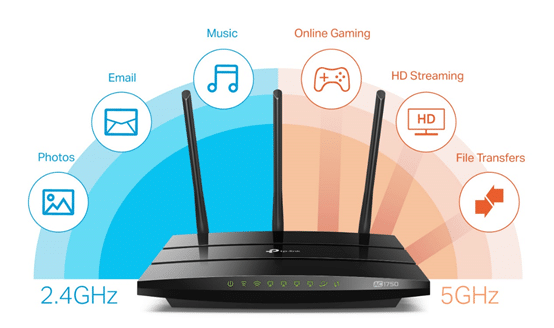
Modern routers often provide dual bands: 2.4GHz and 5GHz. While 2.4GHz covers longer distances, 5GHz offers higher speeds. Connect compatible devices to the 5GHz band to instantly improve download and streaming performance.
Benefits of 5GHz Band
- Higher data transfer rates
- Less interference from other devices
- Better for HD streaming and online gaming
Limit Bandwidth-Hogging Applications
Some apps consume large amounts of bandwidth, reducing speed for other devices. Close unnecessary apps, pause cloud backups during heavy use, and prioritize traffic with Quality of Service (QoS) settings on your router. Check out our Best Android Apps post for apps that help monitor usage.
Consider Wi-Fi Extenders or Mesh Systems
If your home is large or has multiple floors, using a Wi-Fi extender or mesh network system ensures consistent coverage. Products like Google Nest Wi-Fi or Netgear Orbi create a seamless network, eliminating dead zones and improving speed.
Benefits of Mesh Networks
- Consistent Wi-Fi coverage throughout your home
- Automatic switching between nodes
- Easy setup and management via apps
- Supports multiple high-speed devices simultaneously
Secure Your Wi-Fi Network
An unsecured network allows others to use your bandwidth, slowing down your connection. Use strong passwords and WPA3 encryption if supported. Changing default router login credentials is also essential for security.
Security Tips
- Create a unique, strong password
- Use WPA2 or WPA3 encryption
- Disable guest networks when not in use
- Regularly monitor connected devices
Conclusion
Improving your Wi-Fi speed instantly is achievable by testing your network, optimizing router placement, updating firmware, switching to 5GHz, managing bandwidth, and securing your connection. For advanced users, mesh networks and Wi-Fi extenders provide excellent solutions for large homes. Apply these strategies today and experience faster, smoother, and more reliable internet connectivity for work, entertainment, and smart home devices.